Adith's signature logo
Work
Whatfix Information Architecture Revamp Banner

Designing for Discoverability: Rethinking IA at Whatfix

Background

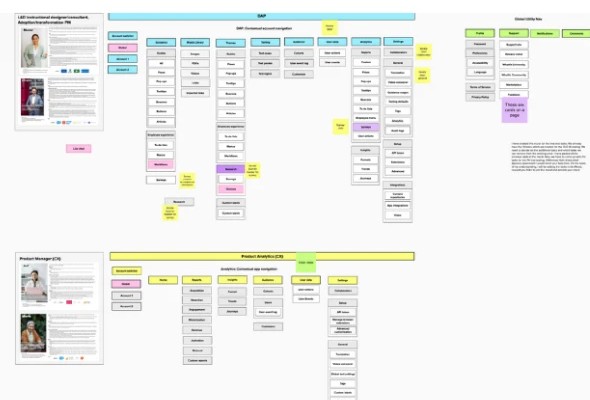
The design body within the organization initiated the "Project IA revamp," which involved a collaborative effort with two product designers, a UX writer, and a project manager. Whatfix, a SaaS-based platform, specializes in offering in-app guidance and performance support for web applications and software products. The platform enables companies to develop interactive walkthroughs that appear within web applications, facilitating the creation and analysis of content. Whatfix is currently broadening its range of product offerings, and this particular project's objective is to develop a new and improved Information Architecture (IA) for the DAP and other offerings. The revamped IA aims to align with the customer's thought process and ensure scalability across all product lines. I was tasked with the responsibility of defining the IA for the short-term for the DAP product and productizing as much of it as possible which meant an entire architecture and navigation revamp which was to be a huge change for existing users.

The Problem

Information architecture is the information backbone of the site; navigation refers to those elements in the UI that allow users to reach specific information on the site. Our current Whatfix information architecture represents only our DAP offering and has key problems:

Does not scale - not only within our DAP product but also across new product verticals like Product Analytics and Enterprise Admin

Does not reflect our customers’ mental model - both in information feature grouping, and terminology

Has low discoverability of product offerings.

These have been validated with the tree test of the current IA. The outcome of the current IA tree test results has been poor. The current Benchmark is at a failing grade of 27%.

The old Whatfix dashboard UI
The previous dashboard UI which was tested.
Tree test success rate chart
The overall success score for the old IA was only 27%.

Goal

Design the Information Architecture of the Whatfix Platform that matches customers' mental models and supports our growing ecosystem which is scalable for multiple devices and products. Our goal is 50% with tree test with no Nav UI and ~67% with Nav UI. To achieve the goal of seamless IA we needed to set the benchmark of the current IA by knowing more about the user behaviour and internal product plans to understand the experience of current IA. To set the benchmark, the methods we used were: Tree testing & Card Sorting.

What We Learnt from the Initial Benchmarking Exercise

Tree Tests

The objective of the tree test for the DAP product was to define a benchmark baseline to measure DAP success against and asses users’ mental models and use these insights to guide the future IA. To achieve this 17 participants were given 14 tasks and were asked where would they go to complete these tasks in our current dashboard IA.

Diagram of tree test insights
A look at the insights from the tree test.

The findings of the tree test were as follows:

  • Out of 14 tasks tested, 11 had low Tree-jack consolidate scores, indicating difficulty for new users in completing essential tasks like configuring a beacon and adding video content. Only 1 task (inviting users) was successful.
  • 8 out of 14 tasks had success rates below 15%, confirming user confusion and difficulty in navigating and completing tasks.
  • 7 tasks had first-click rates below 35%, indicating navigation challenges. Only inviting users and viewing flow analytics had first-click rates above 75%.

Key takeaways from the tree test:

  • Labelling confusion requires reassessment.
  • Consider placing theming options separately from general settings.
  • Visibility rules need a broader access point.
  • Clarify the distinction between content and widgets.
  • Review the organization of the main menu and settings to improve clarity and avoid reliance on a "More menu".
  • The current IA was failing.

Card Sorting

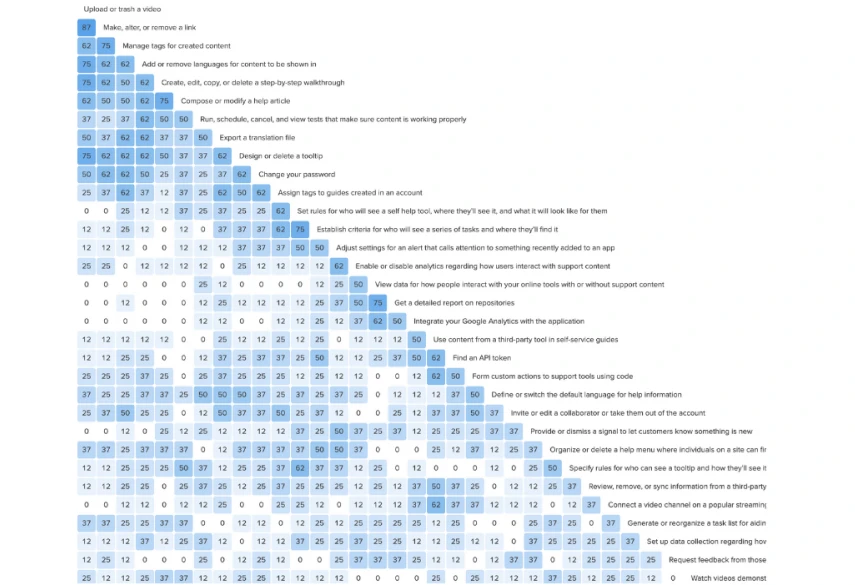
The goal of the card sort tests for the DAP product was to understand user categorization of Whatfix information and features, informing future IA. 17 participants completed an open card sort, organizing 33 cards into intuitive categories and labeling them, aiming to match customer mental models through theme analysis.

Card sorting analysis data
Analysis of the card sorting exercise.

The Key task analysis takeaways of the card sort test were as follows:

  • Participants frequently grouped Self Help and Task List cards together (42-67%), but less often with other widgets and content (21-42%), suggesting a preference for separation.
  • Users grouped visibility rules for widgets and content in 42-64% of cases, indicating potential usefulness in separating general rules/audiences from creation.
  • Participants commonly grouped cards related to DAP analytics, suggesting an expectation for a distinct location for this content.
  • Cards related to flows, articles, and tooltips were grouped over 50% of the time, suggesting they may better relate to "widgets" than "content".
  • Links and videos were grouped 85% of the time, indicating a preference for categorizing them together, potentially separate from articles and flows.
  • Participants frequently connected repository and video channel cards (42-78%), indicating an expectation for imported content to be in the same space.
  • Common participant-created categories included third-party tool configuration (29%), admin/settings (52%), analytics/data/reporting (76%), and guidance creation/management (100%).

The Improvement opportunity areas discovered from the test were as follows:

  • Establish distinct task areas aligned with mental models.
  • Refine navigation and feature labels for clarity.
  • Enhance accessibility with multiple entry points for key terms.
  • Streamline terminology and clarify settings, theming, and rules.
  • Organize tasks based on mental model associations.
  • Fine-tune labels to convey functionality clearly.
  • Simplify crowded categories into digestible subcategories.
  • Provide separate routes for visibility rules and theming.
  • Rearrange integration and imported content for clarity.
  • Enhance labeling and taxonomy for clearer navigation.
  • Reconsider the organization of analytics and reporting.
  • Develop a purposeful settings section, avoiding catch-all categories.

How We Solved It

As this project is signed under NDA, contact me at adithkvn@gmail.com

Broadly, the following steps were undertaken:

  • Engage with users to discuss various discrepancy points identified in the initial tree test and card sorting analysis.
  • Develop a preliminary structure for Information Architecture (IA) or reorganize existing structures based on insights from the tree test, card sorting exercises, and user interviews.
  • Validate the new architecture through closed card sorting and moderated user research sessions.
  • Integrate adjustments derived from the above exercises and conduct a tree test to ensure alignment and build confidence within the internal team.
  • Design a new navigation system and test it alongside the revised IA.
  • Coordinate with all teams and stakeholders to ensure alignment on changes, addressing any potential areas of concern or blind spots proactively.
  • Collaborate with engineering to divide the project into manageable scopes for incremental implementation.

What Went Into the Product

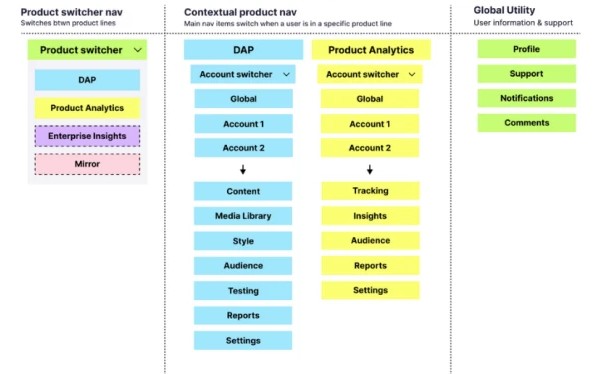
Approximately 80% of the modifications in the new Information Architecture (IA), including terminology adjustments, regrouping, and the introduction of new navigation and multi-product switcher, were successfully integrated into the product.

The remaining changes are scheduled for implementation by the end of the year. The navigation was designed and structured in a manner that adhered to WCAG 2.2 compliance guidelines. Additionally, I introduced several small experience enhancements such as expanding and collapsing navigation, implementing a search function for workspaces, enhancing the notification component for better informativeness, a new banner to prompt installation of the creation extension, a new coming soon page as well as a new 404 page which gave users a better visibility of system status thus enhancing the overall user experience.

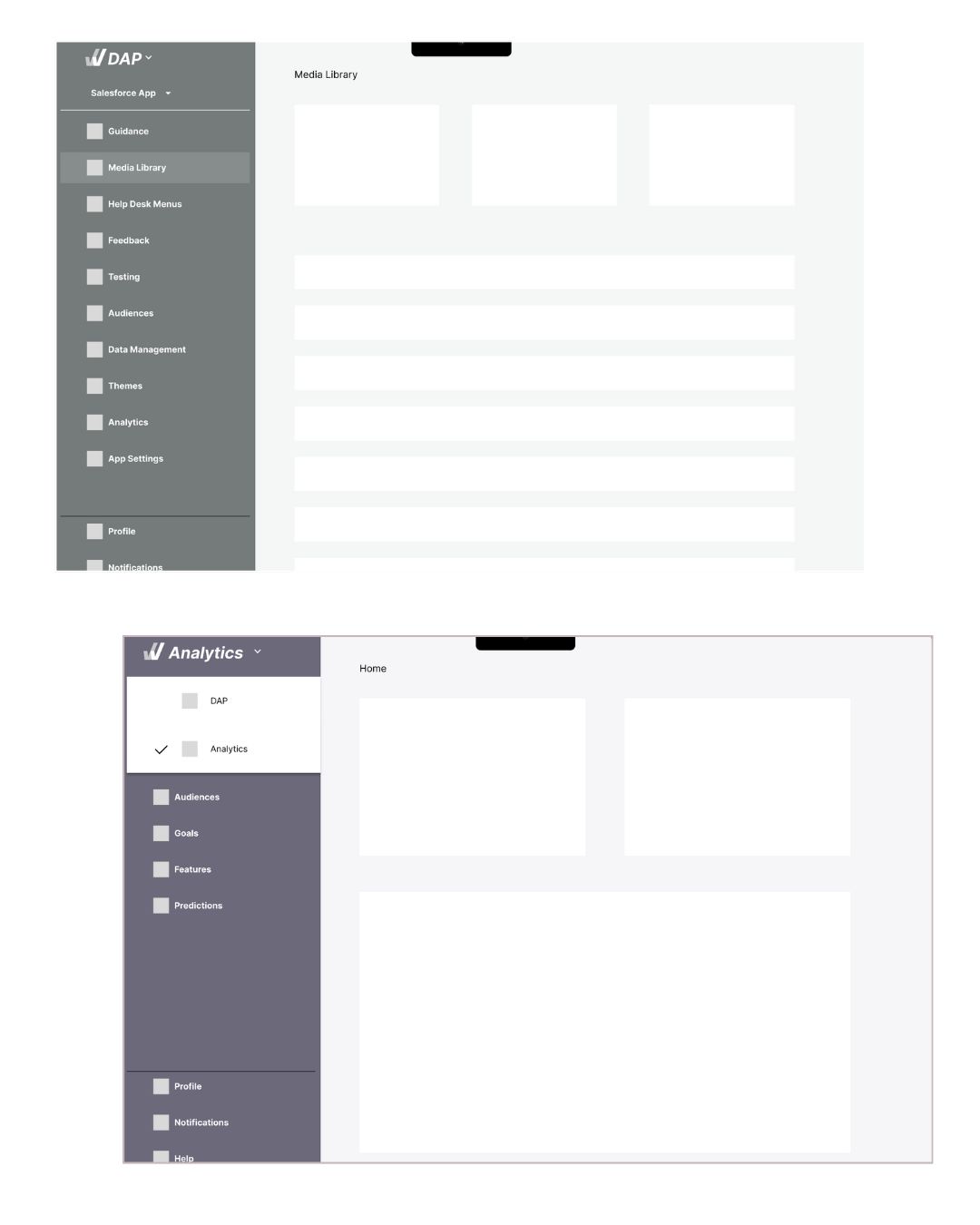
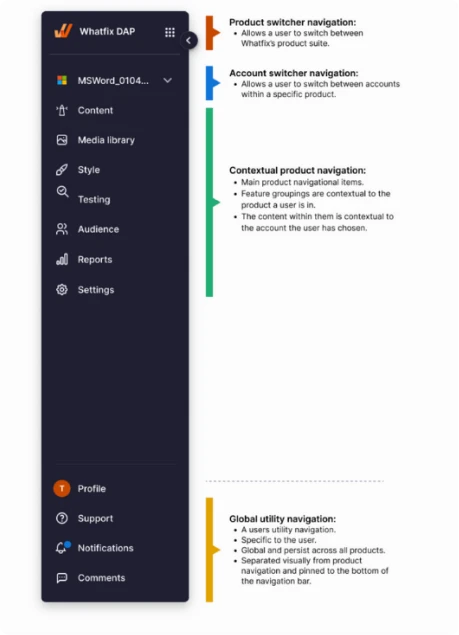
New navigation system and design system components
The new navigation system in various states and its design system specifications.
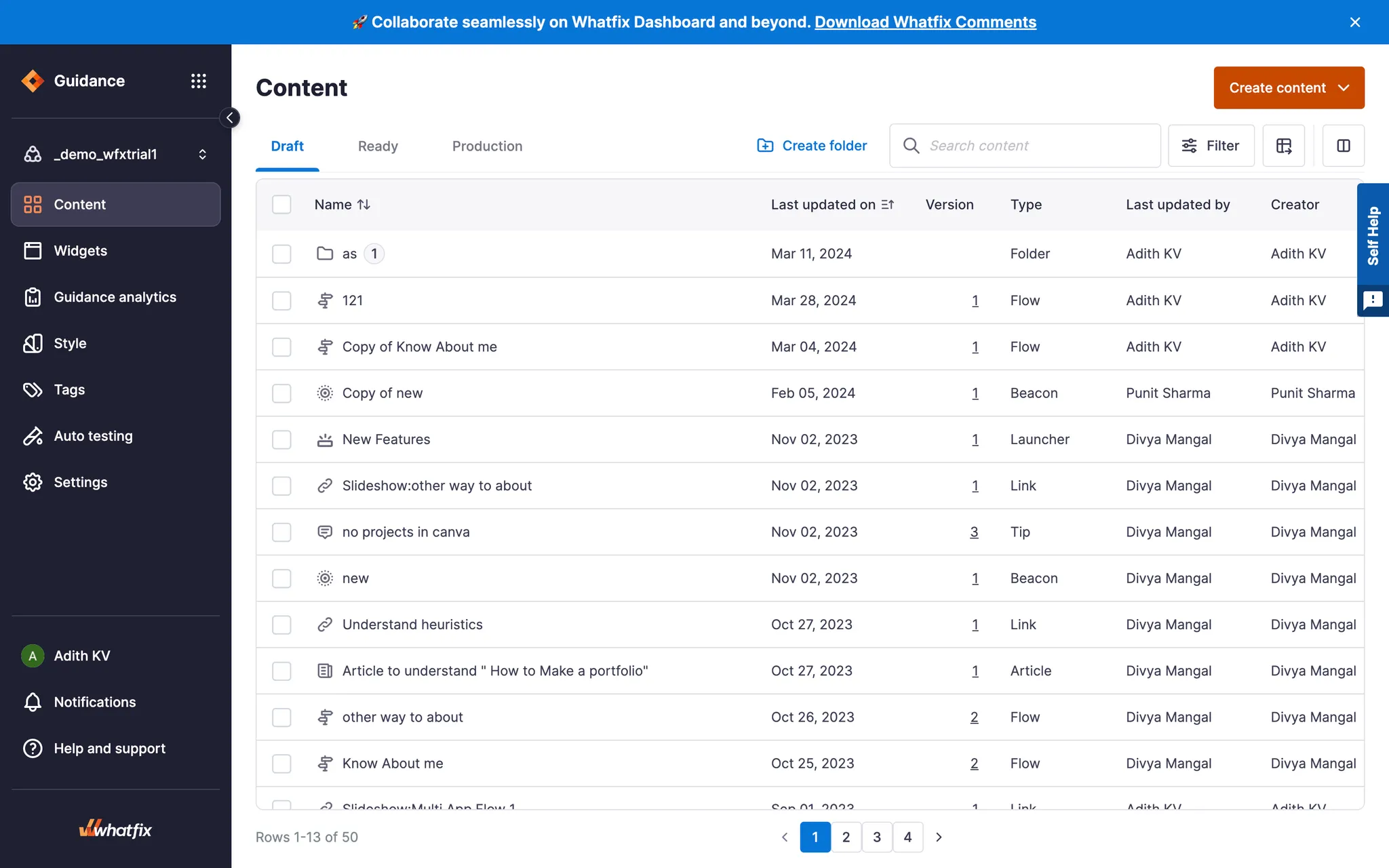
New Content Dashboard View
A detailed view of the new Content dashboard with updated navigation.
Dashboard Navigation Master Component
Detailed design specifications for the dashboard navigation master component.
More about it: What's new in Whatfix Desktop Dashboard

Impact

The new IA structure resulted in a tree test score of 88% and a SUS (system usability scale) score of 86.3 which is excellent and acceptable.

Post implementation, the new experience received a lot of great qualitative feedback with multiple customers specifically pointing out the product team as a whole for such an improved experience.

Positive customer feedback
A customer expressing their love for the new dashboard experience.

Challenges Experienced

Challenges faced during the IA framing:

  • Crafting task phrasing for tree tests posed challenges, requiring a balance between ambiguity and clarity.
  • Recruiting users familiar with Digital Adoption Platforms (DAP) but new to Whatfix proved challenging; efforts focused on diverse vendor backgrounds and newly onboarded customers.
  • Establishing clear guidelines for card sorting sessions was crucial, with some participants creating overlapping categories, prompting guideline refinement.
  • Terminology research and benchmarking revealed non-standard industry terms, expanding project scope.
  • Identifying suitable placements for hidden features proved difficult due to the enterprise nature of the product, necessitating efforts to integrate features while refreshing terminology for clarity.

Challenges encountered during implementation:

  • Overcoming inertia among certain teams to adopt the new framework slowed down implementation. Since the project impacted nearly all teams within R&D, their involvement during the initial stages was limited, leading to the need for persuasion and rectification of potential issues.
  • Technical debt prevented the merging of certain categories, resulting in only 80% of the proposed IA changes being implemented.

What Could Have Been Done Better

  • Improved R&D-wide communication: Could have facilitated quicker alignment and reduced implementation time.
  • Pre-recruitment of users for testing at project initiation: Would have streamlined the testing process and improved efficiency.

Learnings

  • I acquired knowledge on conducting tree testing, determining the appropriate type of card sorting based on the problem, and delved into terminology research to understand its impact on the overall user experience.
  • I also learned the importance of properly documenting components to facilitate design system teams in building them in a componentized manner.
  • Despite encountering some hiccups during implementation, I thoroughly enjoyed the process.

THE END